Mine a Planet Items: Time Skip, Batteries & Treats (2026)
Use Mine a Planet batteries and Alien Treats with dated screenshots. Check targets, timers, paid Time Skips and the Super versus Strong name gap.
Last updated: 2026-10-27
For batteries, equip the item and tap a drone on its dock. Alien Treats target an alien on your platform. Read the exact item name and timer first: the paid Skip board and a reported code reward are different acquisition paths, and the published “Super Alien Treat” label is not verified as the “Strong Alien Treat” shown here.
Two dated gameplay sources
Screens reviewed on October 27, 2026: BemmyBlox’s July 15 recording and Kream Blox’s July 23 recording. Item names, boost labels, prices and timers describe those recorded servers. These are observed screens, not a current shop catalog, a redemption test, an offline-income rule or a stacking formula. The creators also use paid features; their displayed payouts are not a free-player forecast.
- BemmyBlox · 2026-07-15 · MINING an ENTIRE PLANET in ROBLOX...
- Kream Blox · 2026-07-23 · trying to get on the LEADERBOARD in Mine a Planet on Roblox
Check the offer, choose the target, read the timer
- 1
Read the Skip board before spending Robux
At 6:55 in BemmyBlox’s recording, the board beside the sell counter offers Skip 5m, Skip 15m and Skip 2h. Each row has a cash preview and a separate Robux price. Read both before accepting any purchase prompt. The DISCORD reward is reported as a 5-minute Time Skip on our codes page; this shot does not demonstrate redeeming or activating that free reward. Use your current inventory instructions rather than assuming the paid button spends a code item.
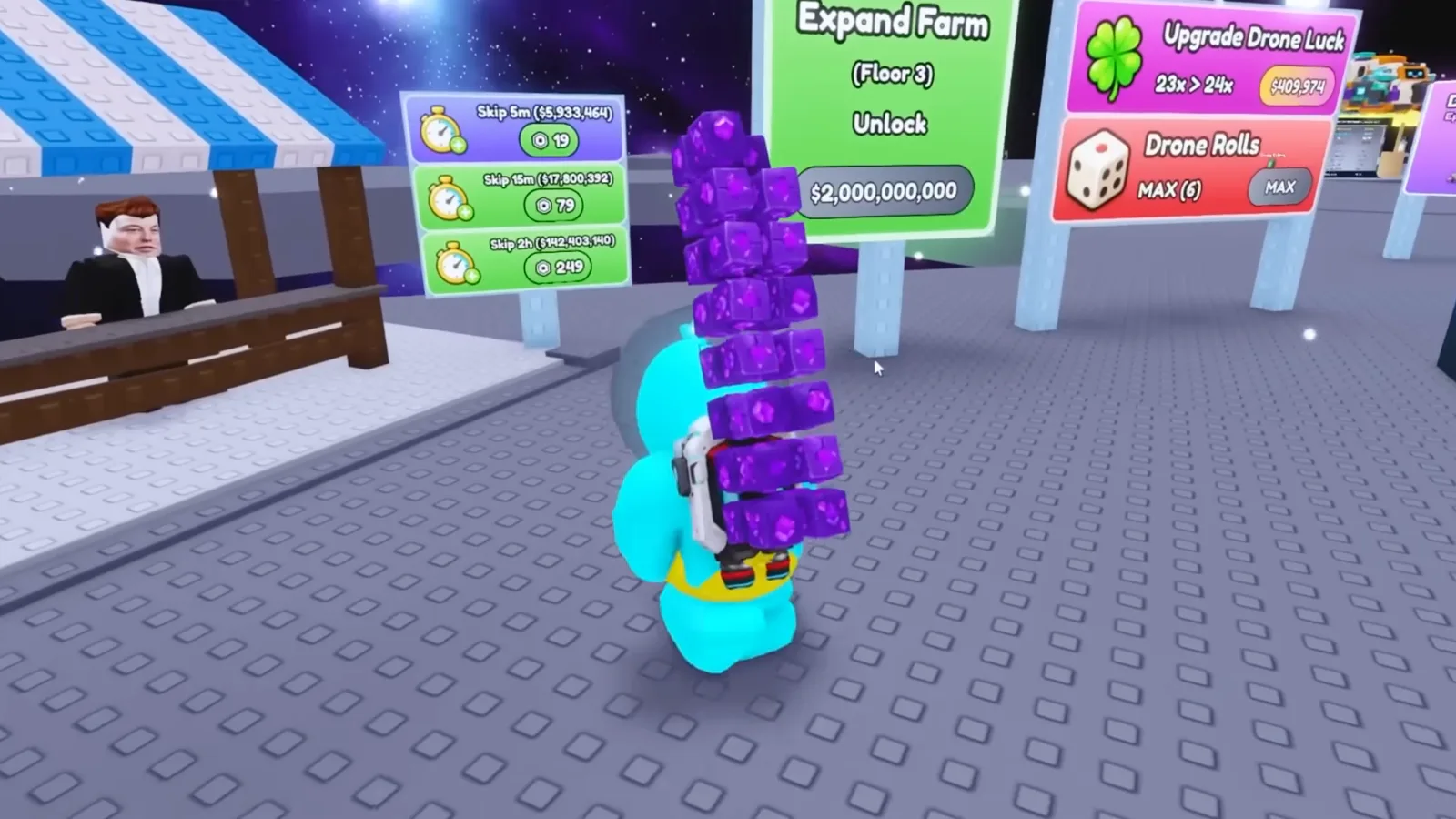
BemmyBlox 6:55 — the cash preview is not the purchase price.Watch at 6:55 - 2
Equip a battery and read its drone-target instruction
The Normal Battery tooltip at 7:10 reads “2x Mining Boost for 5m.” and “Tap a drone dock to apply.” Select the battery, return to the dock and choose the intended drone. This is a named battery variant with its own tooltip, not evidence that every battery has the same multiplier or duration. Check the label again if your inventory says Strong Battery instead.
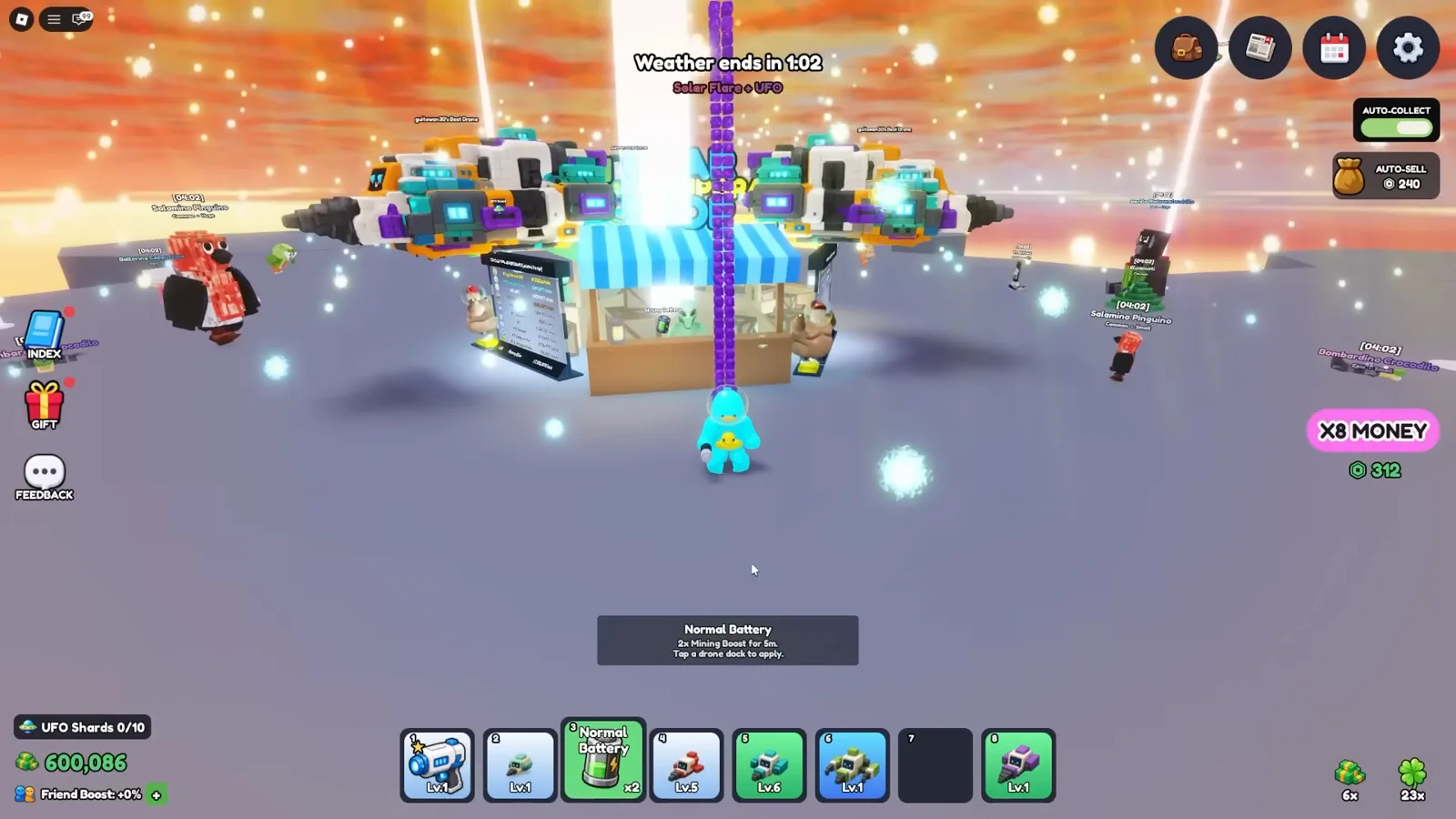
BemmyBlox 7:10 — read the item’s target before tapping.Watch at 7:10 - 3
Check the Strong Battery marker on the chosen dock
Following Strong Battery use, the 8:45 shot shows a green [4X] marker with [09:30] remaining beside the selected drone. Confirm that a boost indicator appears at the target you intended before consuming another item. A local marker does not establish a fleet-wide boost. The surrounding recording also has a separate X8 MONEY purchase banner, so the displayed payout cannot be used to derive a battery-only income formula.
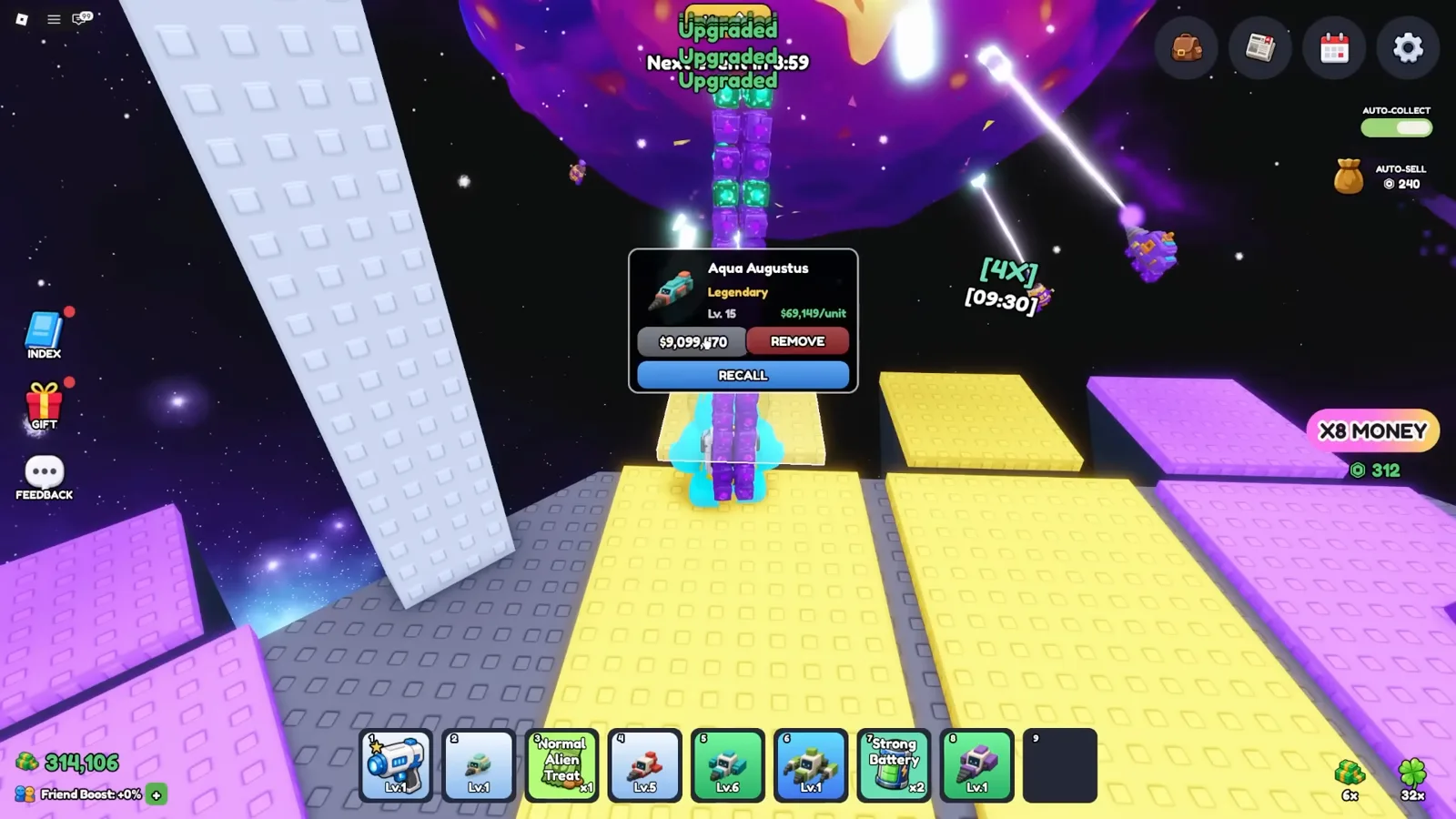
BemmyBlox 8:45 — a visible target and countdown, not a stacking rule.Watch at 8:45 - 4
Apply the named Alien Treat to a pet on your platform
At 13:25, the selected item is Strong Alien Treat. Its tooltip says “+20% Stat Boost for 5m” and “Tap an alien on your platform to apply.” Equip that item and tap the intended deployed alien, rather than a mining drone. The screen describes a timed stat boost; it does not prove permanent pet growth. Publications call the BETABETA reward Super Alien Treat, but these recordings do not verify that Super and Strong are the same item.
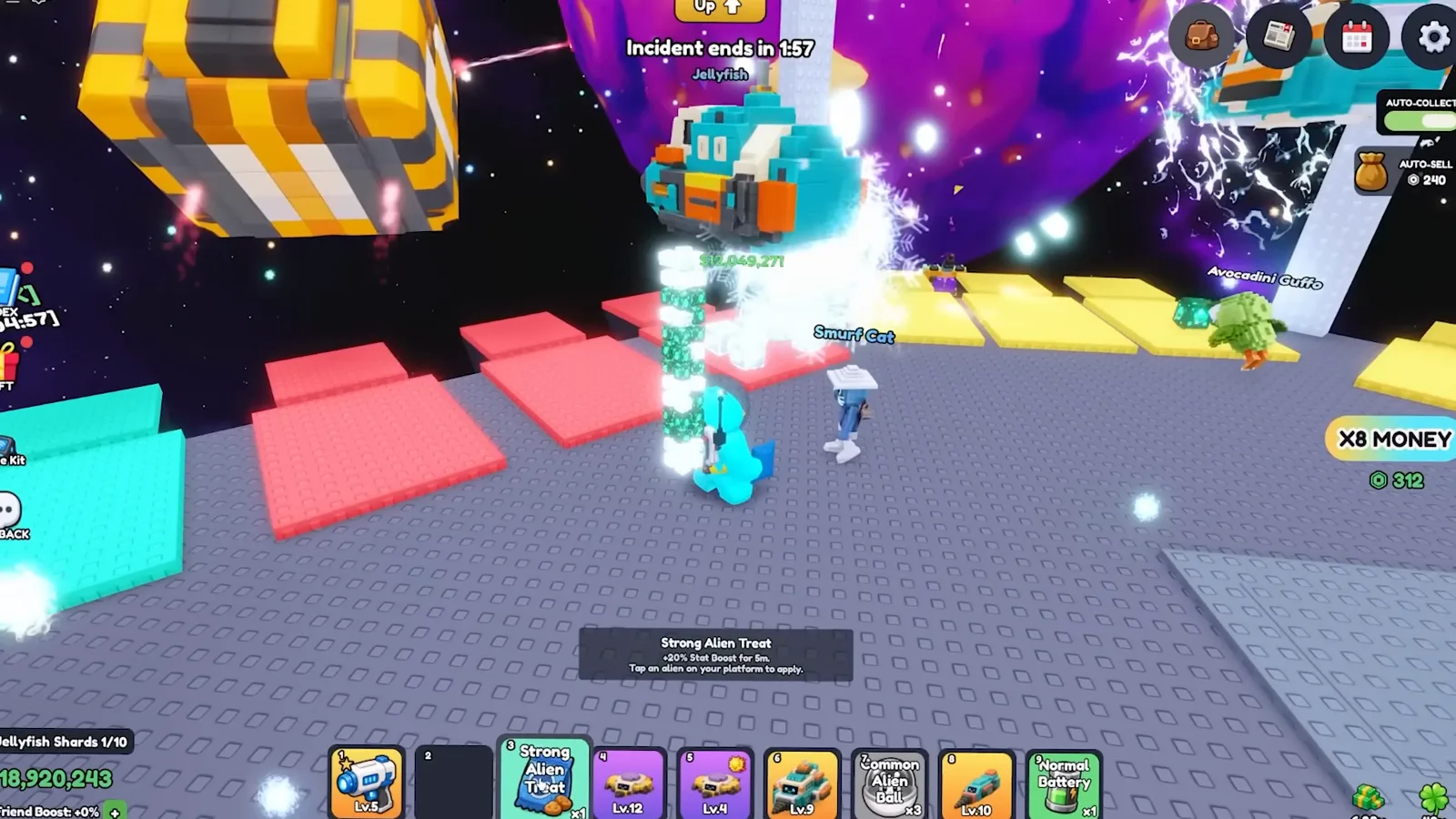
BemmyBlox 13:25 — Strong is the visible name; Super remains an unverified match.Watch at 13:25 - 5
Compare the treat variant and current shop stock
Kream Blox opens the Alien Pets shop at 8:37. Normal Alien Treat is labeled “+10% Stat Boost for 3m”, alongside its stock, purchase options and a restock countdown. This is another named variant, not a substitute tooltip for Strong or Super. Inspect your live shop and inventory before choosing an item; the old price and restock timer in this screenshot are not a current offer.
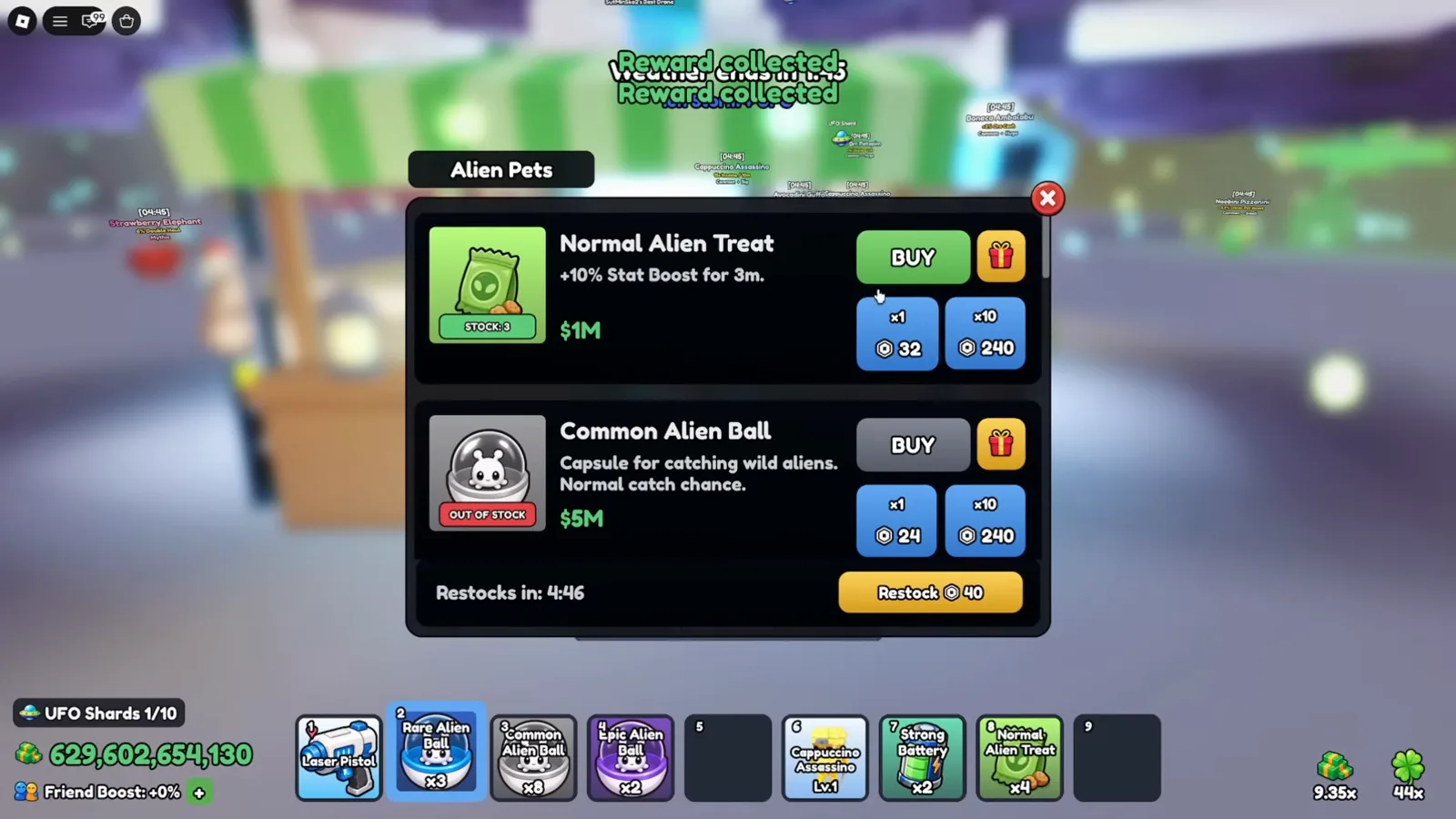
Kream Blox 8:37 — each variant has a separate label and duration.Watch at 8:37 - 6
Read the temporary timer separately from level and skill
At 8:26, one pet has an overhead +20% countdown while a different selected pet’s panel shows Level 12, a DockPlatform earnings boost and a repeating income skill. These are separate readouts. Check the timed marker on the actual target after applying a treat; do not call every number a permanent cash multiplier or use a neighboring pet’s skill as the item effect. Neither recording establishes boost stacking or what happens to a timer while disconnected.
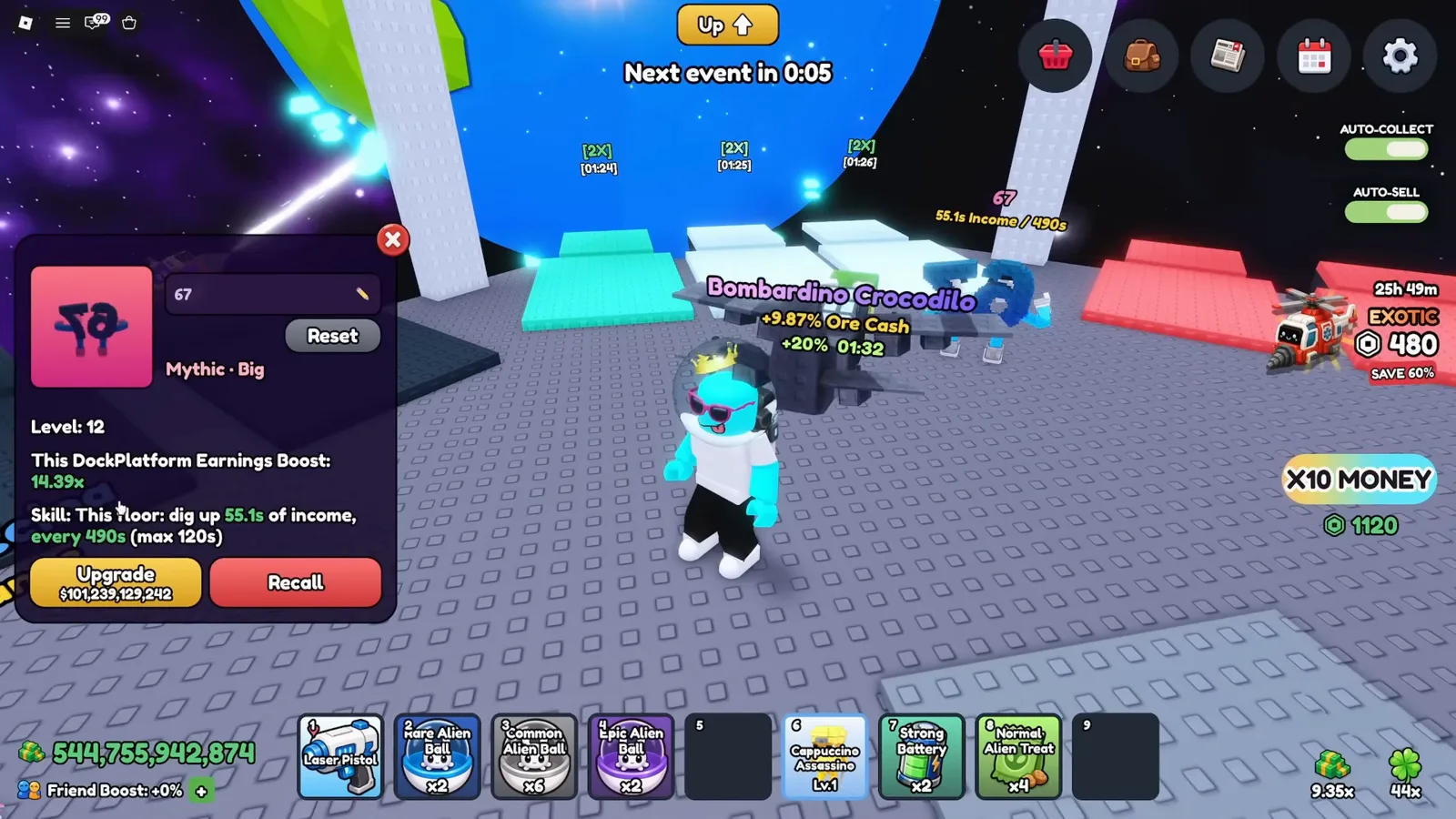
Kream Blox 8:26 — a pet skill and an item countdown are different readouts.Watch at 8:26
Time Skip, batteries and Alien Treats
How do I use a Time Skip without accidentally buying one?
Check where the offer comes from. The recorded Skip board has Robux buttons, cash previews and 5m, 15m and 2h options. Publishers report a separate 5-minute reward for DISCORD, but this footage does not demonstrate that reward’s activation. Follow the current item tooltip and purchase prompt; do not assume a board button consumes a free code reward.
Where do I apply a Strong Battery?
The July 15 recording applies a battery to a drone on a dock and later shows a local 4X countdown after Strong Battery use. Select the intended drone and read your item tooltip. This guide does not establish a fleet-wide bonus, a stacking rule or a current duration from that single recorded countdown.
Is Super Alien Treat the same as Strong Alien Treat?
That equivalence is unverified. Publishers name the BETABETA reward Super Alien Treat; the readable July 15 tooltip says Strong Alien Treat, +20% Stat Boost for 5m, applied to an alien on your platform. Check the exact label in your inventory. The observed timed tooltip is not evidence of permanent pet growth.
Should I stack batteries and treats before using a Time Skip?
The recordings do not isolate that interaction. Paid boosts, pet skills, upgrades and events are present together, so their payouts cannot establish how a skip counts temporary effects. Read the current UI and compare your own before-and-after observations; no guaranteed combination or income formula is confirmed here.
Do these items prove that Mine a Planet earns money offline?
No. A Skip offer and an on-screen boost timer do not establish disconnected earnings, timer persistence or an offline cap. Those rules remain unverified. The linked money guide separates observed mining and collection steps from unknown offline settlement.
Rewards, pets and progression
Explore More Tools
Reported Mine a Planet codes with dated sources. Redeem on your own account to confirm the current status before relying on a reward.
Tier ListEvery drone documented from the in-game Drone Index, banded by the game's own rarity ladder and the odds read off roll pedestals — not by invented stats.
CalculatorFree online Mine a Planet calculator for drone odds, evolution planning, and fleet income. Uses your inputs and labeled anchors, never invented rates.
Luck CalculatorTurn any 1-in-N drone rarity into expected rolls, expected time, and the chance of at least one pull within X attempts.