Mine a Planet Money Guide: Cash, Boosts & Screenshots
Improve your Mine a Planet money routine with dated screenshots: check storage, pet boosts and Index rewards, then measure cash before your next upgrade.
Last updated: 2026-10-14
Start with collection and selling, then compare your boosts
For a practical money routine, check that your mined cargo is being collected and sold, inspect the pet bonus on each Dock Platform, and look for an available Index cash reward. Change one thing at a time and measure your own cash balance. These are checks you can perform in the game, not a proven best-build formula. The screenshots below show one July session; its huge balance and x10 MONEY badge do not predict your current earnings.
Source and limits of these screenshots
Observed evidence: Blayv, Full Money Guide To Unlock EVERYTHING In Mine A Planet!, uploaded July 17, 2026. Each image links to its exact scene. Panel names, displayed values and collection rewards are dated observations. The x10 MONEY banner belongs to the event session shown, not a permanent multiplier. The video does not verify offline settlement, current prices, the order in which boosts combine, or an income formula. Measurements you enter into a calculator are estimates, not game rules.
Seven checks from the money-guide footage
- 1
Check cargo collection before buying another upgrade
Look at Cargo and Dock Storage on your upgrade boards, then watch a mining-and-selling cycle. At 4:26 the July boards read Cargo MAX (9) and Dock Storage MAX (96); those are this player’s displayed upgrades, not starter values or a confirmed current cap. The creator explains why storage and manual collection matter for AFK play. Auto-Collect and Auto-Sell are on in this session, so do not assume your account has them or that this proves offline income.
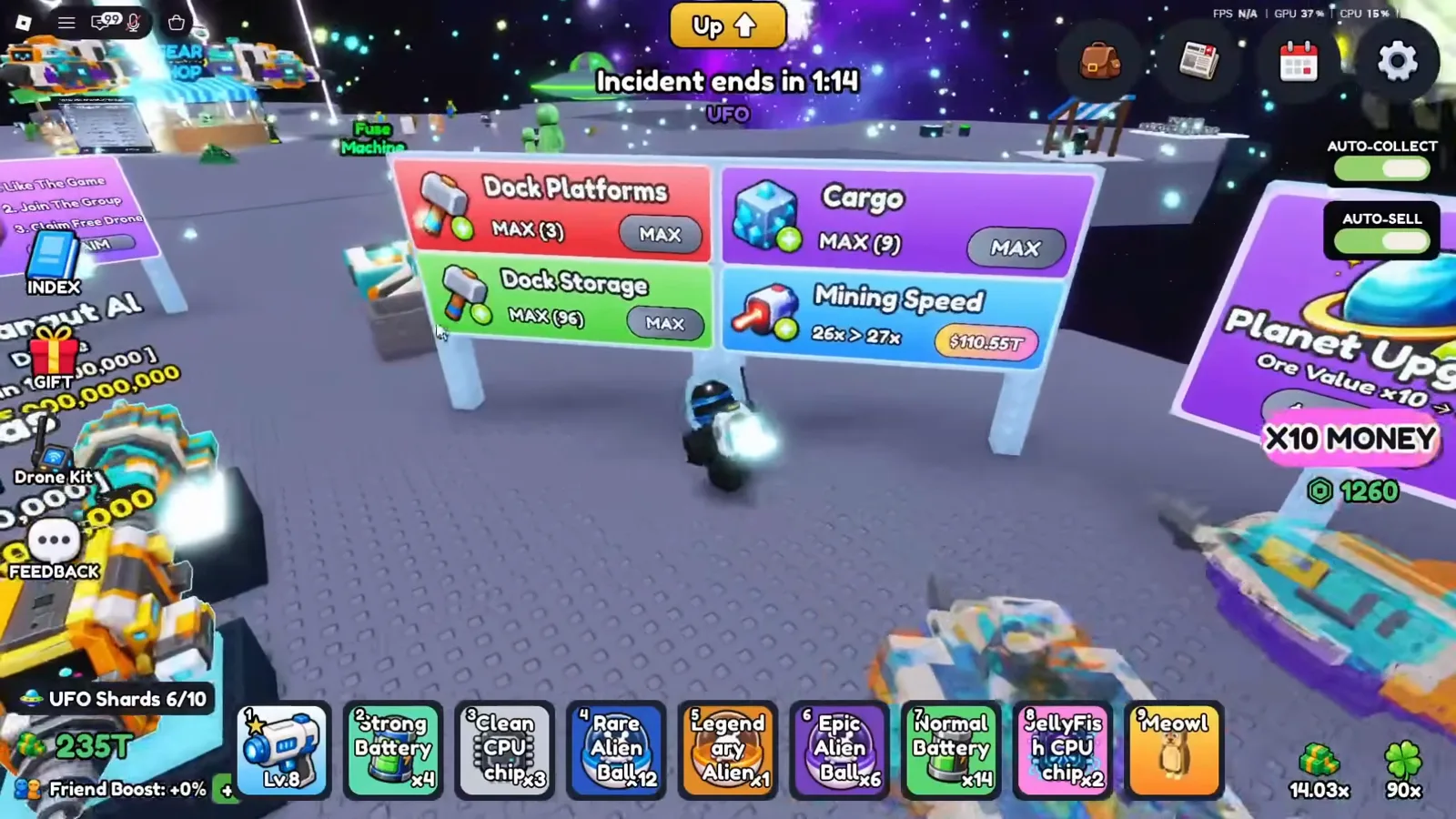
Observed at 4:26 on July 17, 2026: this account’s upgrade boards; current caps and offline rules are not verified.Watch at 4:26 - 2
Read the pet earnings bonus and skill separately
Open the pet on a Dock Platform. At 2:28, the level-35 Skibidi Toilet panel shows “This DockPlatform Earnings Boost: 13.33x” and “Global Mining Speed +4% (max 25%)”. One line describes that platform’s earnings; the other describes a skill. This is a dated leveled-pet example, not a fixed bonus for every Skibidi Toilet or proof that pet bonuses add or multiply across the whole fleet.

July 17 observation at 2:28: two different panel fields, not a fleet-income formula.Watch at 2:28 - 3
Check what another pet’s skill actually affects
At 2:37, the level-35 Meowl panel also reads 13.33x for DockPlatform earnings, but its skill is “Global Alien Flee Slow +10% (max 30%)”. This skill text concerns alien fleeing, not an additional cash percentage. Compare the exact panel on your own pet instead of choosing a pet only by rarity or treating every skill as a money boost.

Observed at 2:37 in the July 17 video: read the skill’s target, not just its percentage.Watch at 2:37 - 4
Inspect the Pets Index cash milestones
Open Index → Pets and inspect the reward row below the collection. At 2:14, this session shows Pets Discovered 30/30 (100%) and Cash milestones labeled +5%, +10%, +15% and +25% at 25%, 50%, 75% and 100% discovery. That is a July collection snapshot, not proof that today’s roster stops at 30. Check whether your own reward is available or already claimed; the screenshot does not establish whether all four percentages stack.
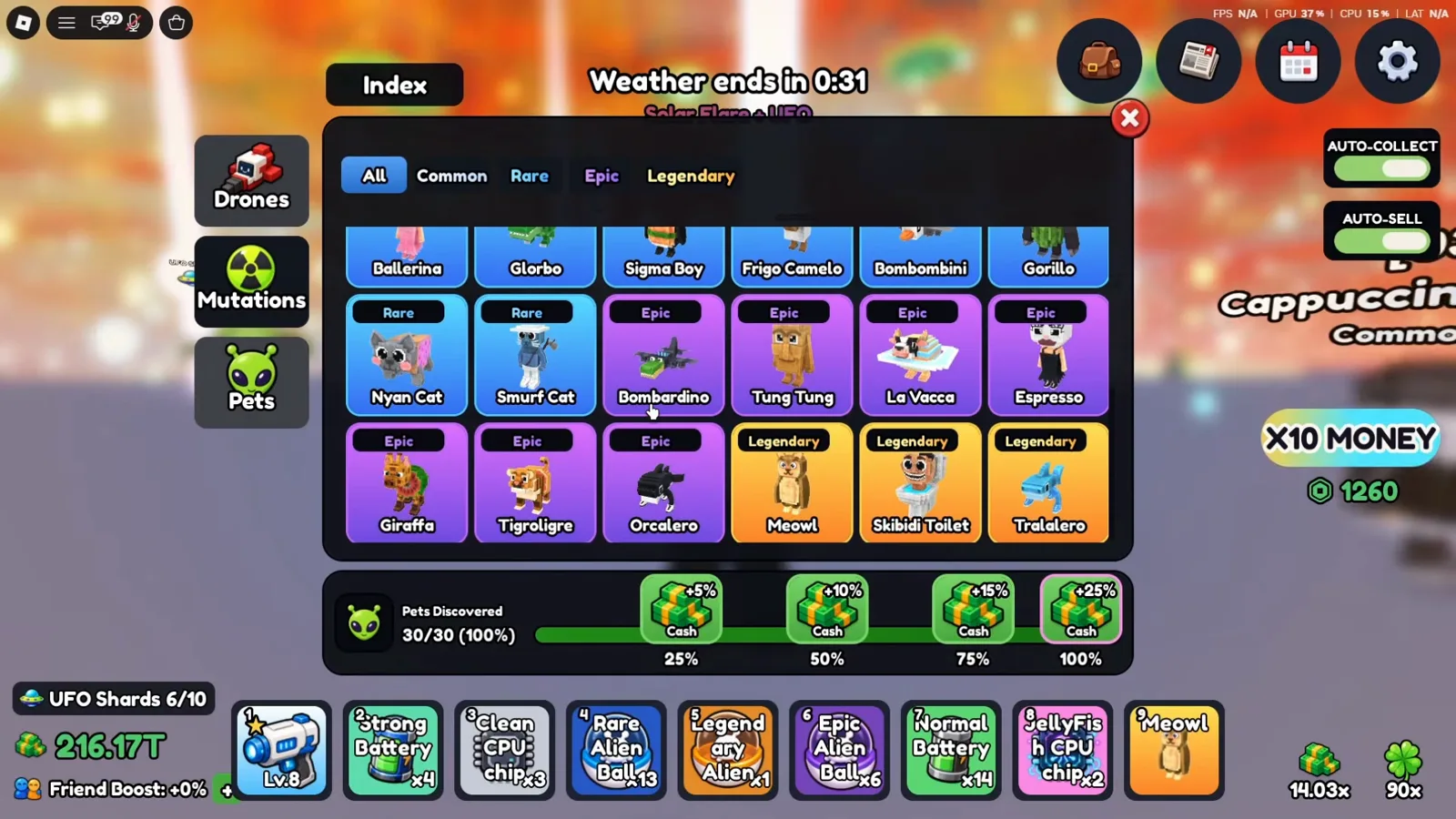
July 17, 2:14: historical collection and reward labels; roster size and stacking may differ today.Watch at 2:14 - 5
Check drone collection rewards without replacing your fleet blindly
Switch to Index → Drones and review your progress. At 5:44, this player has 31/51 (61%) discovered, with the same four Cash milestone labels visible below. Discovery can be a reason to track a new drone even when it is not the one you want to equip. The screenshot is a historical reward-panel read, not a current 51-drone roster, guaranteed upgrade recommendation or quantified return for your next roll.
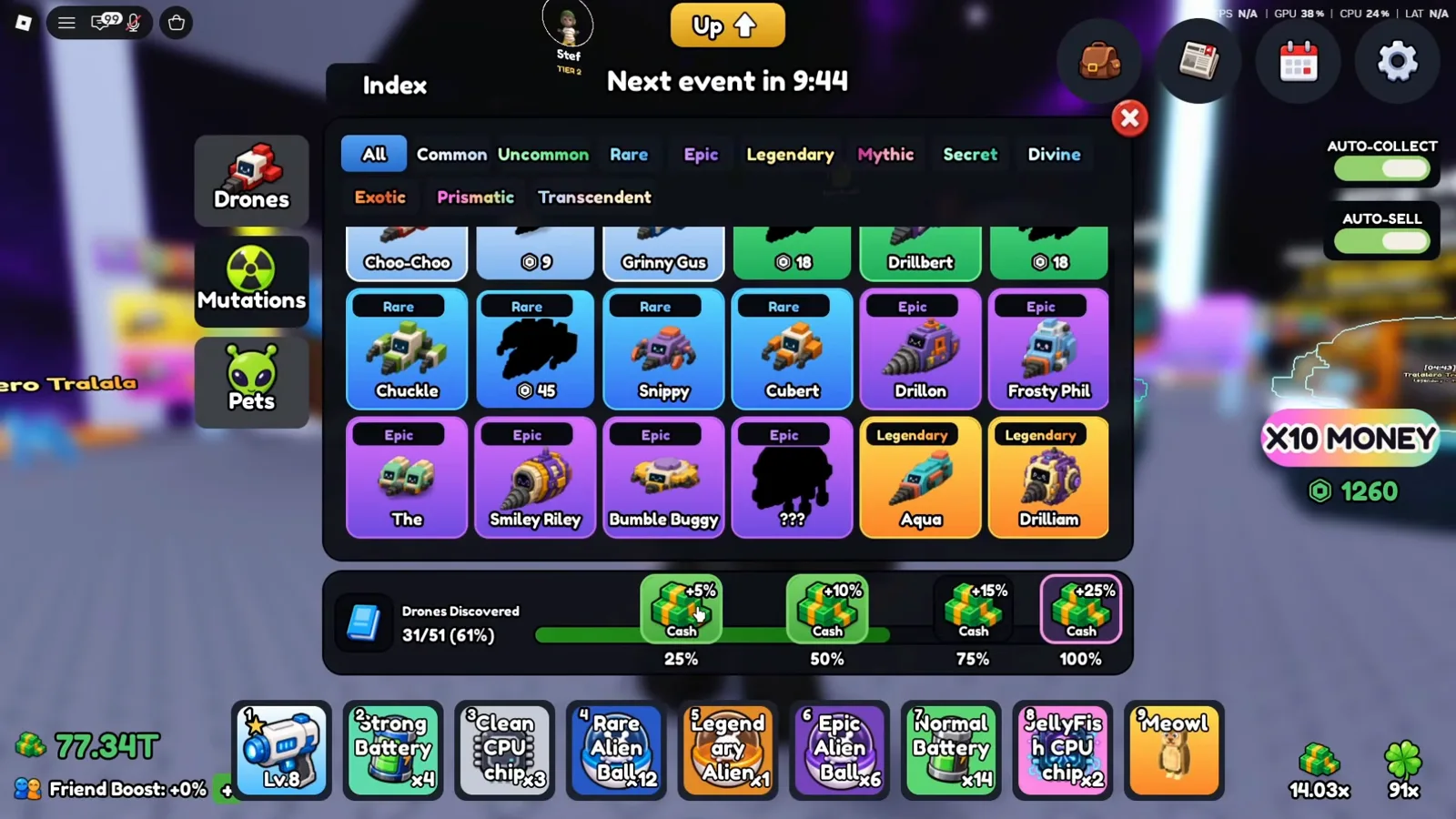
July 17, 5:44: a collection panel, not a verified current drone roster or roll-profit estimate.Watch at 5:44 - 6
Separate the active Drone Kit from docked mining
The Drone Kit panel at 4:02 shows 2/2 Equipped Drones, individual Recall buttons and an Extra Drone Slot purchase button. The creator discusses using these drones for active play. This is a separate panel from Dock Platforms, Cargo and Dock Storage. It does not prove that a purchased slot is required for faster cash, or that the equipped count is your idle fleet size. Review your own active setup before considering a purchase.

Observed July 17 at 4:02: active equipment controls, not a required cash upgrade.Watch at 4:02 - 7
Read your own Friend Boost after joining friends
At 7:25, the lower-left HUD reads Friend Boost: +20% after the creator joins a friend account. Compare that field before and after joining friends in your own session. The scene supports a +20% observation on that account; it does not verify today’s per-friend increment, a maximum bonus or the way Friend Boost combines with pets, Index rewards and an event. Do not add or multiply all the displayed boosts into an invented income formula.

July 17, 7:25: +20% shown here; the current per-friend rule and cap remain unverified.Watch at 7:25
Measure your cash before deciding what to upgrade
Estimate: note your cash balance, play for one minute while collecting and selling consistently, then record the balance again. Avoid purchases or reward claims during the measurement. The difference is a sample of cash per minute in those conditions, not the game’s income formula. Repeat after one change while keeping the same routine. If a weather event starts or ends, or a friend joins, record that difference and avoid comparing the two samples as though only the upgrade changed. Enter your observed values into the fleet income calculator, or your current upgrade-sign cost into the evolution planner. Both are player-input estimates, not verified future earnings.
Use the current data pages for your next decision
The reported codes list owns code strings, rewards and source dates; it does not promise a direct cash gift. Use the pet roster for the documented pets, the drone reference for roster evidence and unknowns, and the mutation reference for dated chip and Index observations. This page owns the money-check routine. A single screenshot cannot supply current costs, guaranteed roll profit or a universally best upgrade order.
Money, offline income and boost questions
Explore More Tools
Mine a Planet ore guide: officially named ores, what each source confirms, and how to read your own values. No invented ore rates.
UpgradesThe four things you can upgrade in Mine a Planet, what each one actually does, and how to decide the order without any published cost table.
Fleet CalculatorConvert your per-drone earnings and fleet multiplier into hourly and daily income, then test what-if upgrades.
GemsHow gems work in Mine a Planet: official earning methods, documented value, and why gem-hack links are scams. No invented mechanics.