How to Get Mutations in Mine a Planet (Roblox)
Mine a Planet mutations, frame by frame from July 2026 footage (updated 2026-08-30): Gear Shop restock timers and the tap-a-drone-dock step that applies one.
Last updated: 2026-08-30
Mutations in Mine a Planet do not come out of a drone roll. They come from CPU chips: you buy one at the Gear Shop stall, select it in the hotbar, then tap a drone dock to apply it — and a Clean CPU chip takes it back off, consuming the chip in the process. Every screenshot on this page was read straight from one 2026-07-17 gameplay clip; each caption deep-links to the exact second. The multiplier table itself lives on the Mutations page — this page is only the discovery-and-apply workflow.
Source footage
Screenshots and steps are based on gameplay recorded by Blayv · full video on YouTube
- 1
Wait for the mutation weather banner
A mutation chip is only useful while the map is inside a mutation weather window, and the game announces the moment one opens. At 0:54 the banner stack reads "Solar Flare + UFO Started!" together with "Drones can mutate - up to 3x value!" — and in the same frame "Gear shop restocked!" fires while the shop footer timer resets to "Restocks in: 4:59". Earlier, from 0:32 to 0:52, the top HUD instead counts down "Next event in 0:21" to "0:00". So the shop is already open and browsable before the weather flips. Whether the restock is triggered by the event or merely happened to land on it is not shown anywhere in the clip.
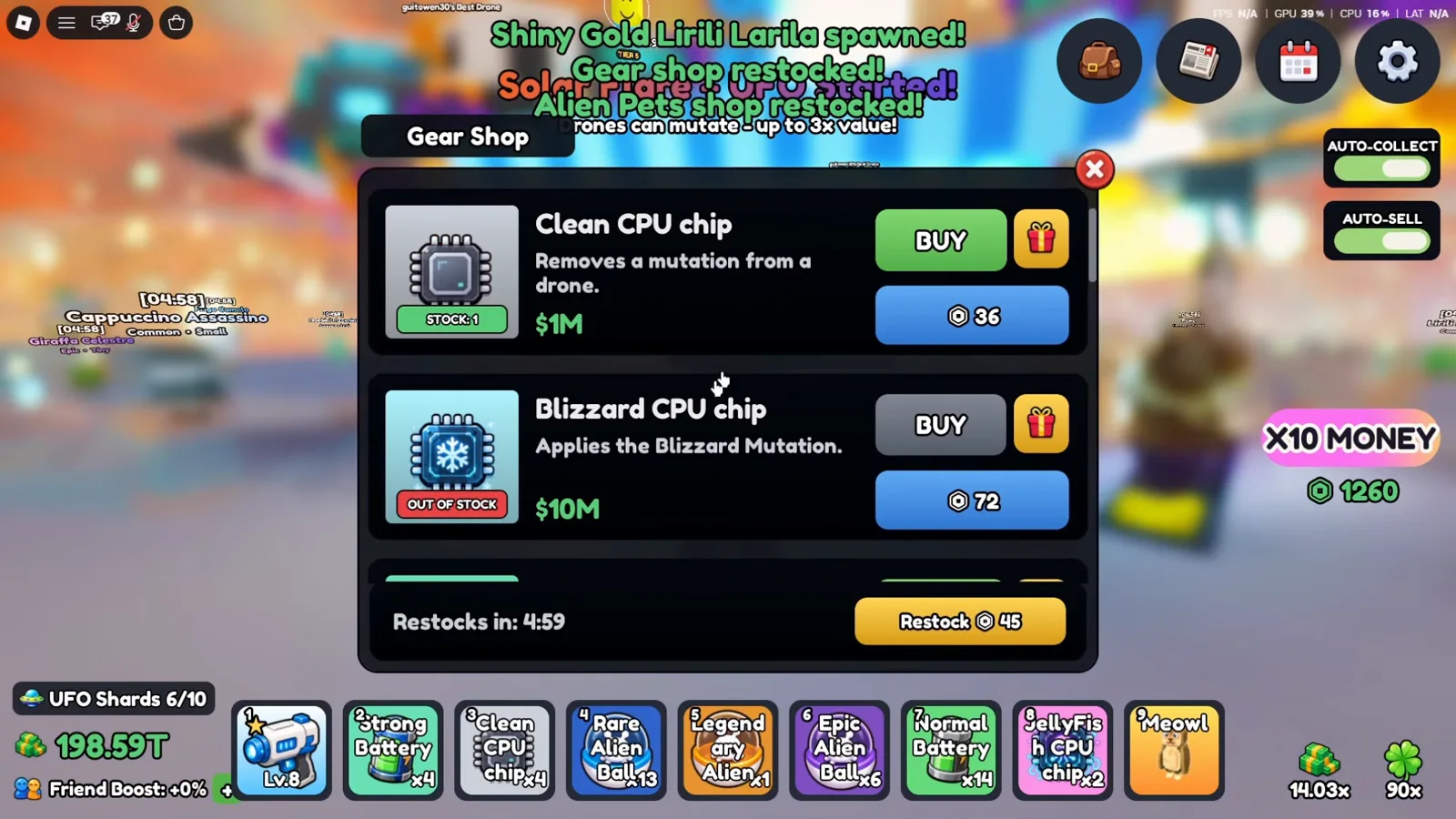
Two independent systems collide in one frame: the weather start and a shop restock.Watch at 0:54 - 2
Find the Gear Shop stall on your base platform
The Gear Shop is a striped-awning stall you simply walk up to. Standing in front of it pops the label "Gear Shop" with an "E Trade" prompt, the same interaction style as the ore vendor. Two other things are readable from this one frame: the Index button sits on the far-left edge of the HUD — that is where you will check your mutation collection later — and the chips you already own live in the numbered hotbar along the bottom, where slot 3 is "Clean CPU chip x4" and slot 8 is "JellyFish CPU chip x2".
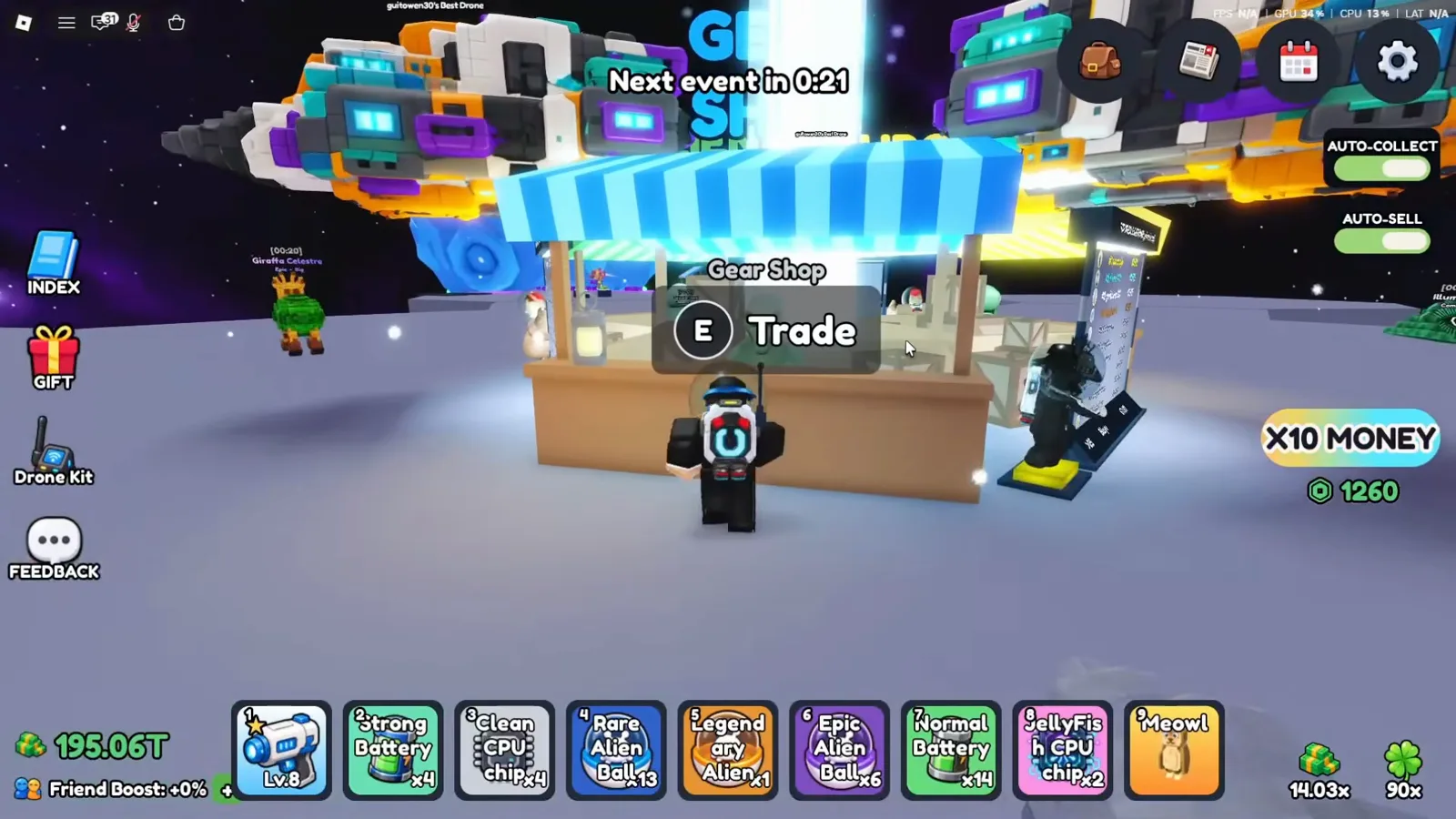
Chips are hotbar items, not entries in a separate mutation menu.Watch at 0:32 - 3
Read the per-item stock badge and the restock timer
Every Gear Shop row carries its own stock badge, and the shop is small. Observed at 0:34: "Normal Battery — 2x Mining Boost for 5m." shows STOCK: 2 at $500K, while "Clean CPU chip — Removes a mutation from a drone." is already OUT OF STOCK at $1M. Each row also shows a second price in the blue token currency on the lower button (27 and 36 respectively) — the clip never names that currency. The panel footer holds one "Restocks in: 0:19" bar plus a "Restock" button priced in the same tokens, so a sold-out chip is a timing problem you can also pay to skip. What the next restock will contain is never shown.
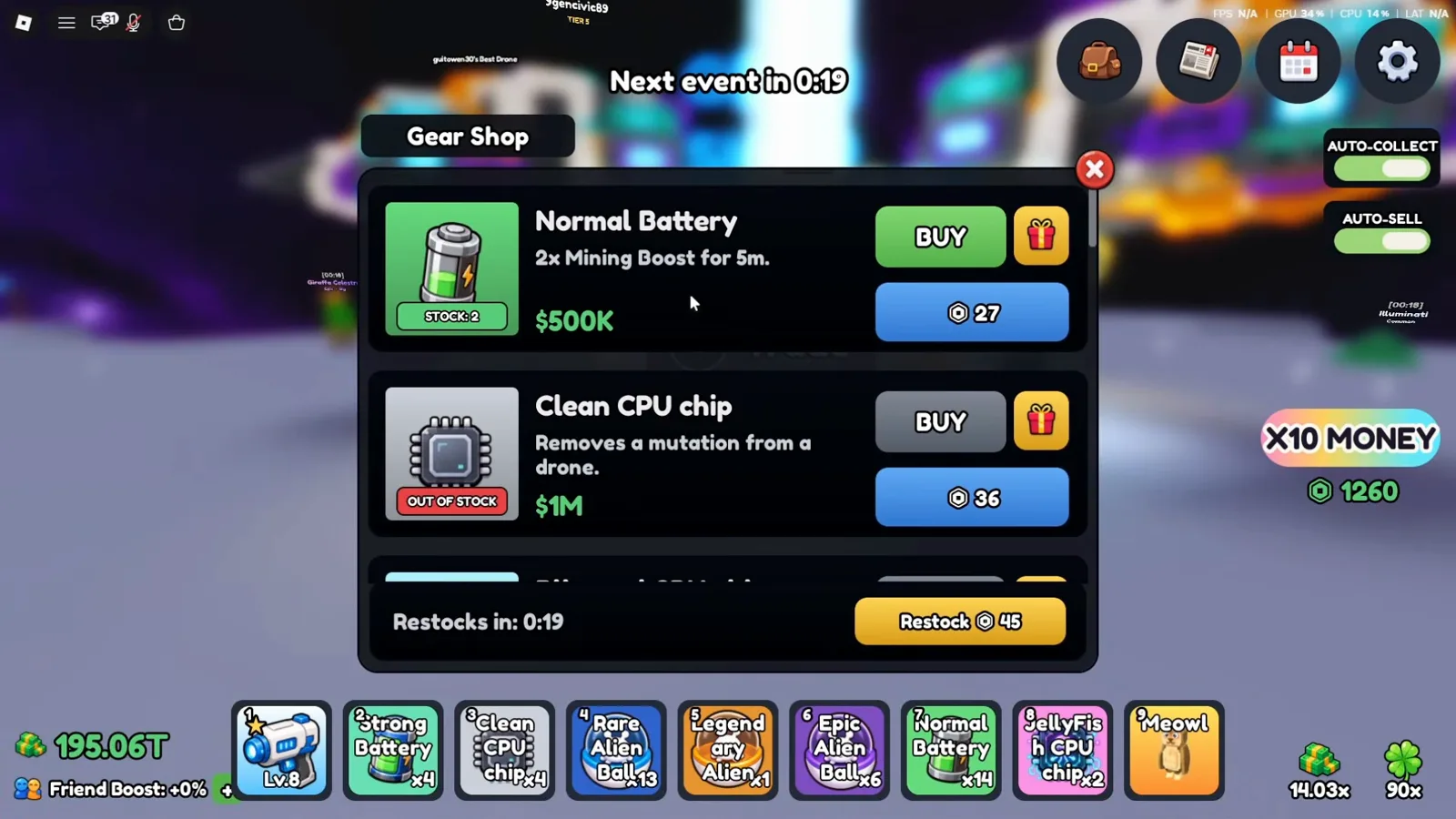
Stock is per row; the countdown at the bottom applies to the whole shop.Watch at 0:34 - 4
Start the price ladder at the cheap end
Scroll one row and the shop's structure is obvious: batteries and chips share a single list, and every chip line reads "Applies the <name> Mutation." At 0:36 the "Blizzard CPU chip" is $10M or 72 tokens — the lowest-priced mutation chip visible anywhere in this footage — and it is OUT OF STOCK too. The row above it is the "Clean CPU chip" at $1M, which is not a mutation at all: its own description says "Removes a mutation from a drone." Reading that line is the difference between buying a multiplier and buying a scrubber.
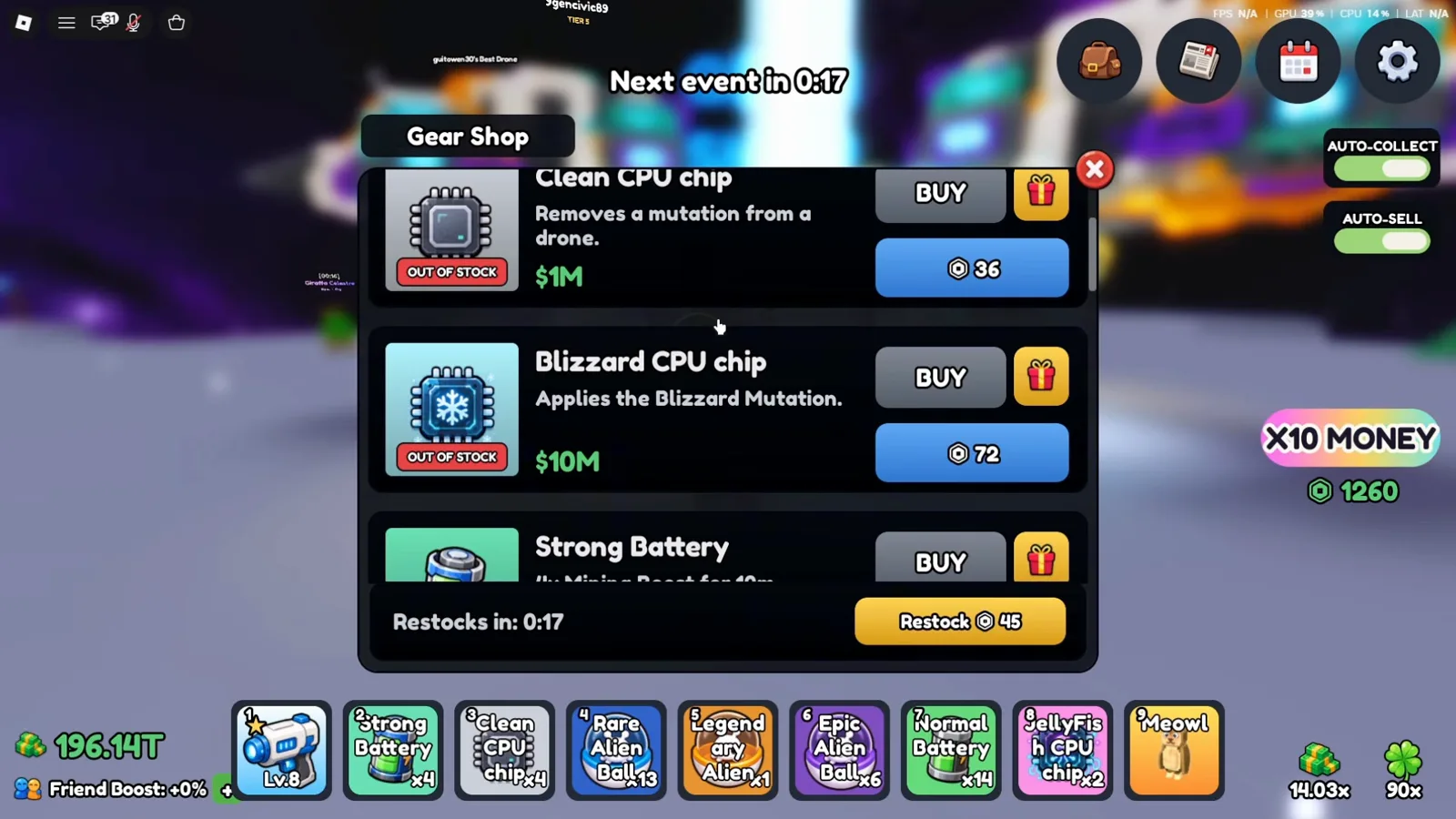
Cheapest mutation chip seen on camera is Blizzard; Clean is the remover, not a mutation.Watch at 0:36 - 5
Ion CPU chip — the rung just below the billions
At 0:52 the list shows "Ion CPU chip — Applies the Ion Mutation." for $750M, or 135 tokens, again marked OUT OF STOCK. The row above it prices "Strong Battery — 4x Mining Boost for 10m." at $50M / 90 tokens, which gives you a useful reference point: a ten-minute mining boost costs about a fifteenth of the cheapest mid-tier chip here. Nothing in the footage shows a chip actually being purchased — the player browses a shop that is sold out at every rung — so all figures on this page are list prices, not money anyone spent.
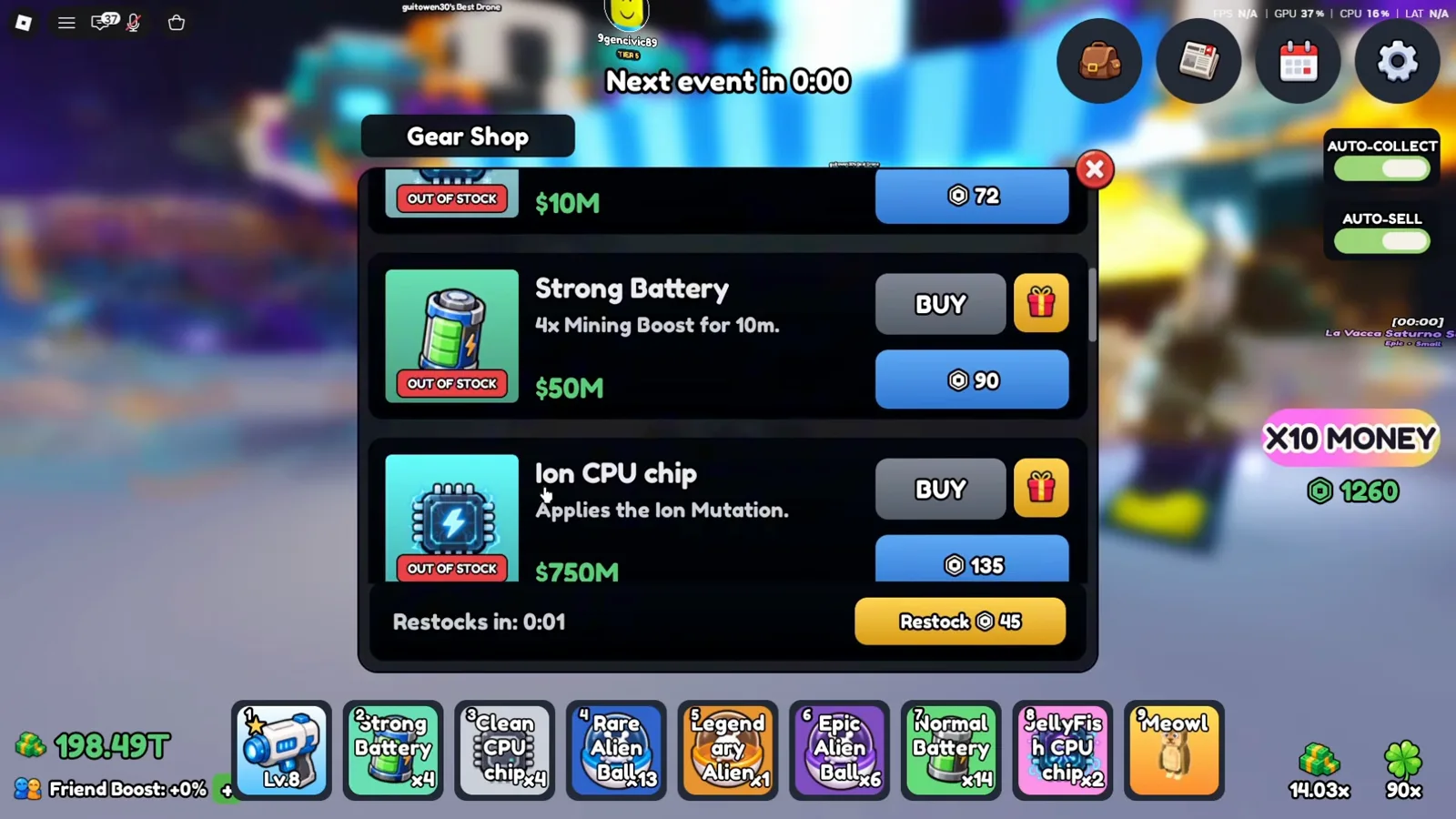
Each row offers a cash price and a token price; the token currency is never named on screen.Watch at 0:52 - 6
Solar Flare and RadioActive are the billion-tier pair
Two more rows at 0:50: "Solar Flare CPU chip — Applies the Solar Flare Mutation." at $1B / 157 tokens, and "RadioActive CPU chip — Applies the Radioactive Mutation." at $10B / 180 tokens, both OUT OF STOCK, with a "Super Battery" row already cut off underneath. Watch the spelling, because the game contradicts itself: the shop title capitalises the A in "RadioActive", while its own description line and the Index tile both use "Radioactive". Prices climb roughly ten-fold per rung, so the number on your own screen matters far more than the name on the tile.
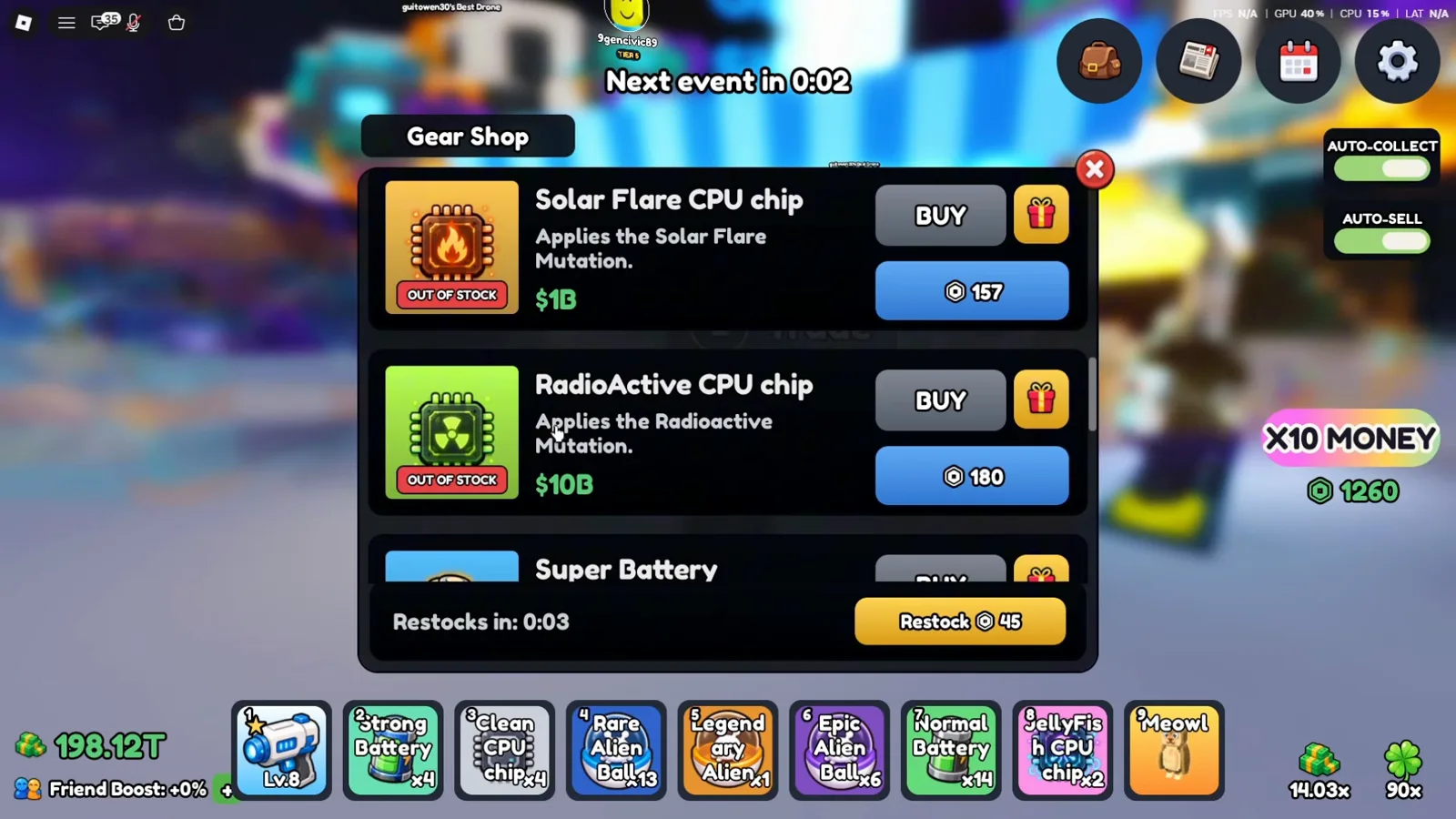
Shop title says RadioActive; the description and the Index tile both say Radioactive.Watch at 0:50 - 7
UFO and JellyFish top the observed list
At 0:46 the two most expensive mutation chips in the clip appear side by side: "UFO CPU chip — Applies the UFO Mutation." for $100B / 360 tokens, and "JellyFish CPU chip — Applies the Jellyfish Mutation." for $500B / 540 tokens. Both are OUT OF STOCK in this frame and a "Prismatic Battery" row is already starting underneath them, so the ladder does not end at JellyFish — it just ends where the recording stopped scrolling. The naming splits again here: the item is "JellyFish CPU chip" but its own description writes "Jellyfish" with a lowercase f.
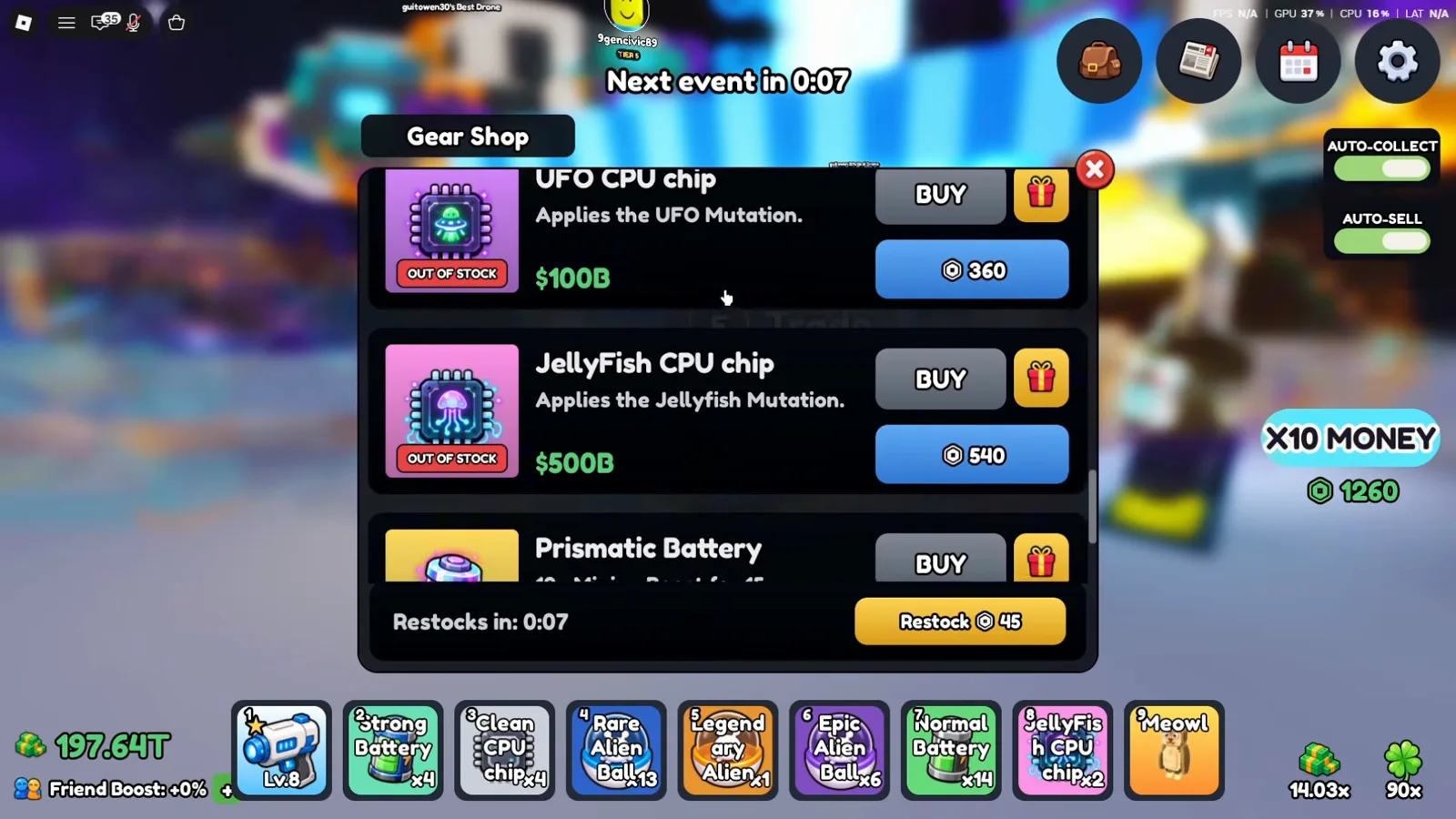
$500B is the highest chip price visible in this footage; a Prismatic Battery row follows it.Watch at 0:46 - 8
Select the chip, then tap a drone dock
This is the entire application mechanic, and the game spends six words on it. With the JellyFish CPU chip highlighted in hotbar slot 8 at 1:02, the tooltip reads "JellyFish CPU chip / Applies the Jellyfish Mutation. / Tap a drone dock to apply." The HUD above confirms which window you are inside: "Weather ends in 1:49" with "Solar Flare + UFO" beneath it. Nothing in the footage shows a confirm button, a menu, or a cost popup between selecting the chip and tapping the dock — the tap is the confirmation.
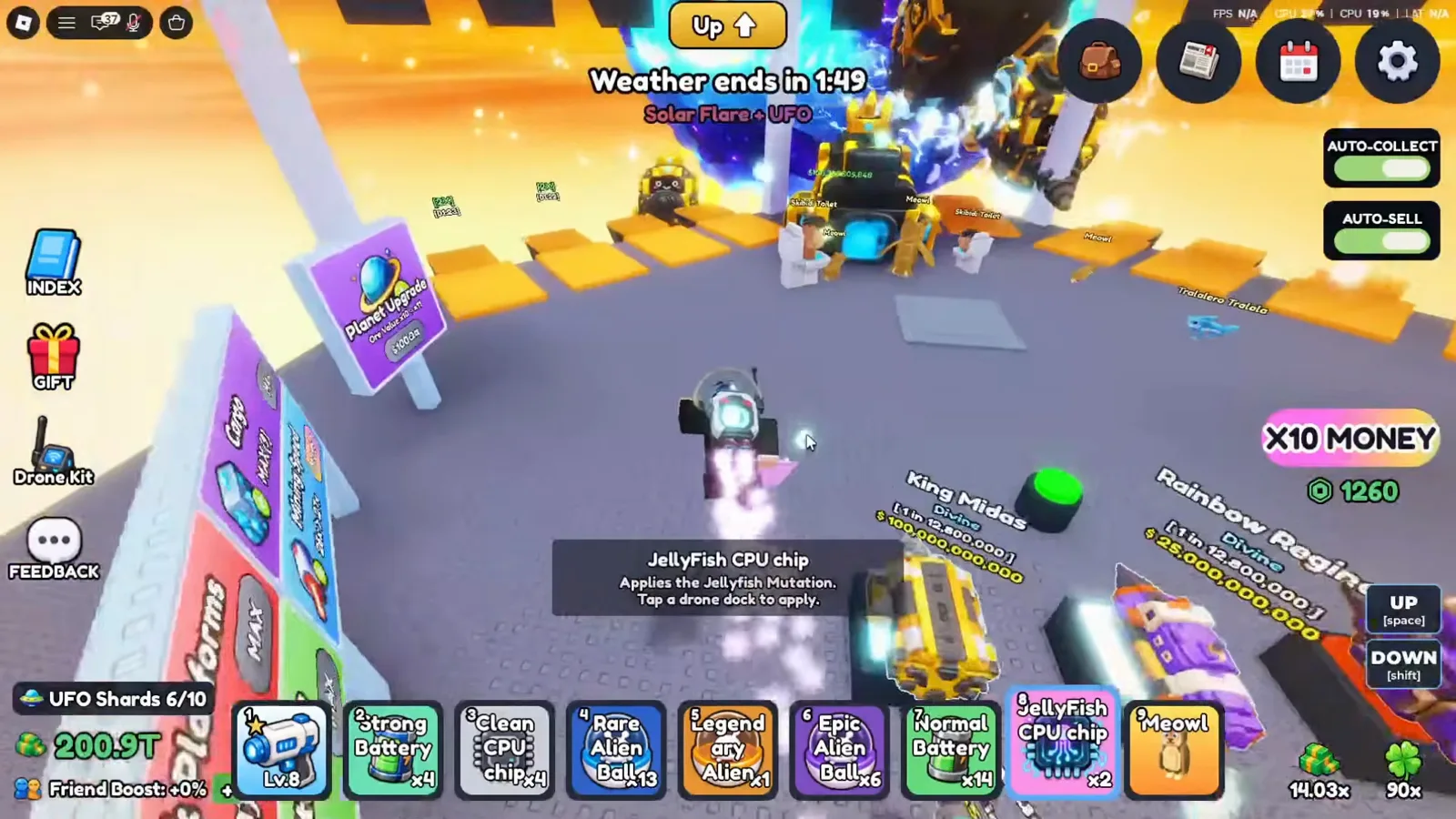
This tooltip is the only in-game instruction for applying a chip in the whole clip.Watch at 1:02 - 9
Track what you have found in Index → Mutations
Open the Index from the book icon on the left edge of the HUD; the tab column reads Drones, Mutations, Pets. The Mutations tab at 1:18 shows one tile per mutation carrying its own multiplier figure, running from 1.35x on Blizzard up to 3.25x on Jellyfish, over a "Mutations Discovered 6/6 (100%)" bar and four milestone chests paying +5%, +10%, +15% and +25% Cash at 25%, 50%, 75% and 100%. The per-mutation table belongs to the Mutations page and is not repeated here — this page only covers finding and applying chips.
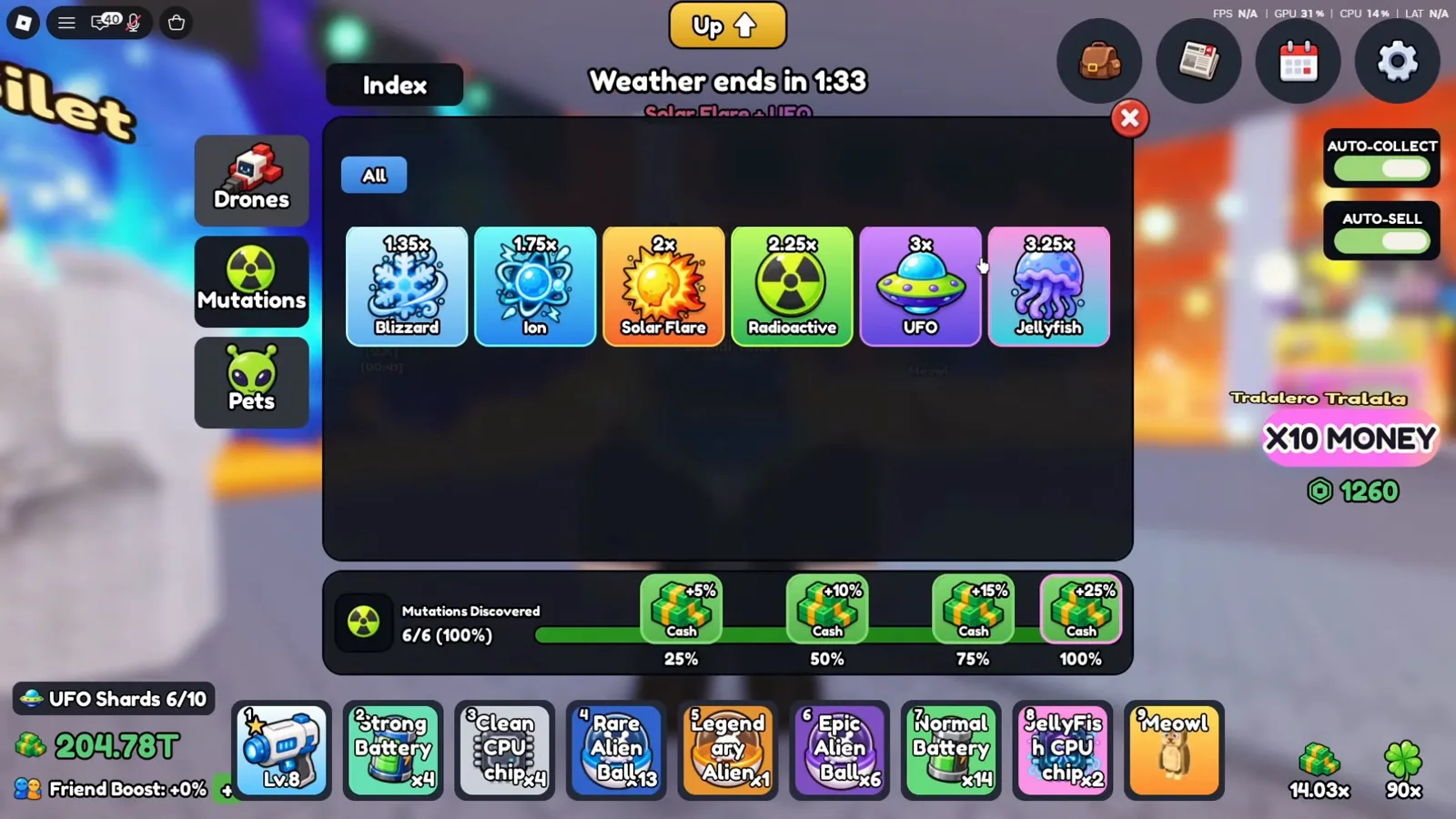
The four chests are Index milestones; the tiles above them are the per-mutation figures.Watch at 1:18 - 10
See where the Index reward actually lands
Five minutes of footage later, at 6:00, the REVENUE panel on the right lists this player's income bonuses: Drone Index +10%, Mutation Index +25%, Pet Index +25%, Feedback Reward +2%, and an Earnings Multiplier of 8x, under a 14.03x total. The Mutation Index line carries the same +25% as the 100%-discovery milestone chest in the Index tab. What the clip does not settle is whether that +25% and the per-mutation tiles act on the same base number — the panel shows percentages, never the arithmetic behind them.
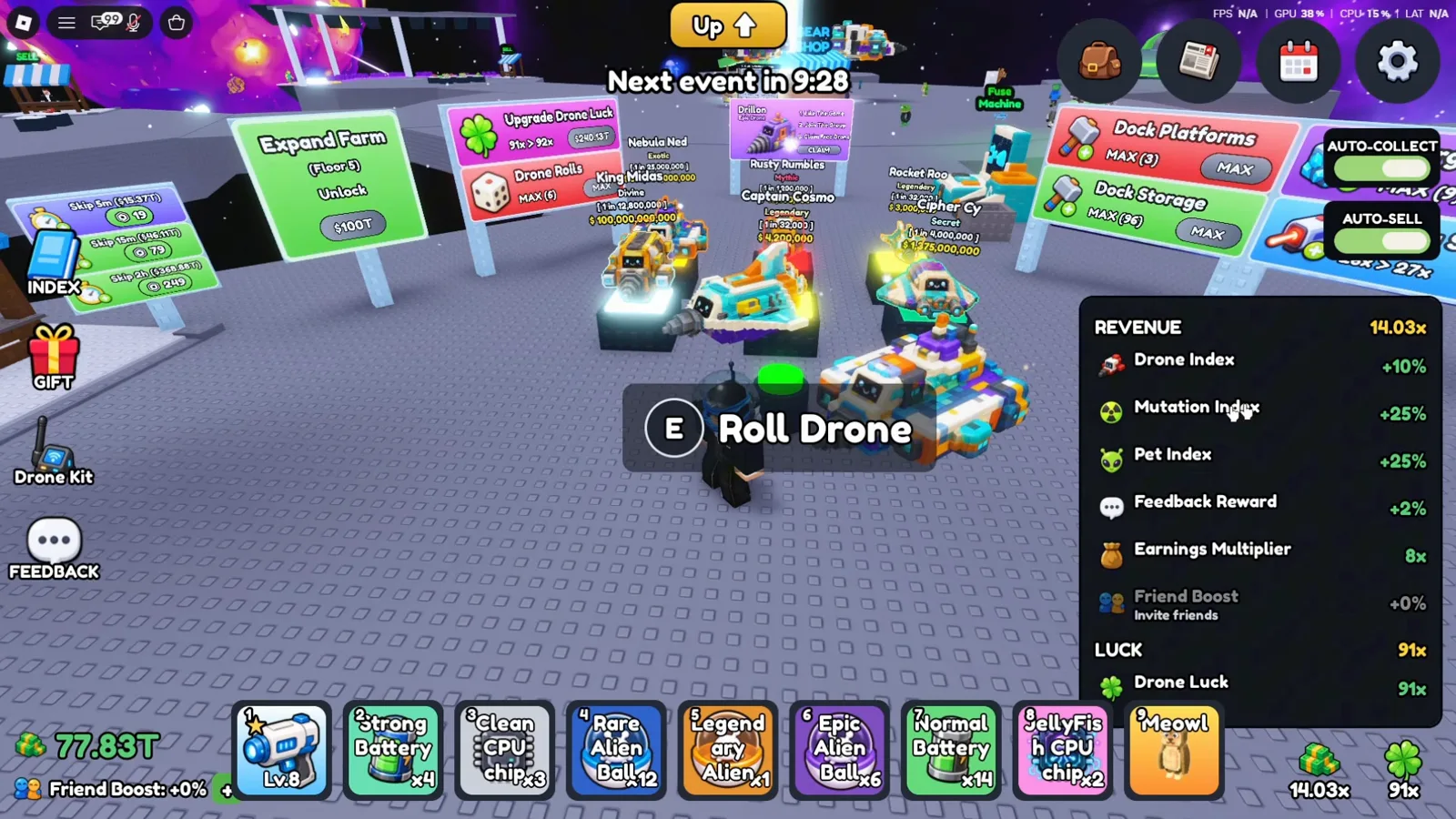
Three separate Index bonuses stack inside one total shown on the right of the HUD.Watch at 6:00 - 11
To undo, select Clean CPU chip and tap the same dock
At 1:28 the drone card for "Comet Curl" is open: rarity "Exotic", the mutation tag "Ion" beside it, "Lv. 28", and a per-unit value of $154,616,221. Hotbar slot 3 — "Clean CPU chip" — is selected, and its tooltip repeats the dock instruction: "Removes a mutation from a drone. / Tap a drone dock to apply." The card's own REMOVE and RECALL buttons are visible in the same frame; the recording never presses them, so this page makes no claim about what they do.
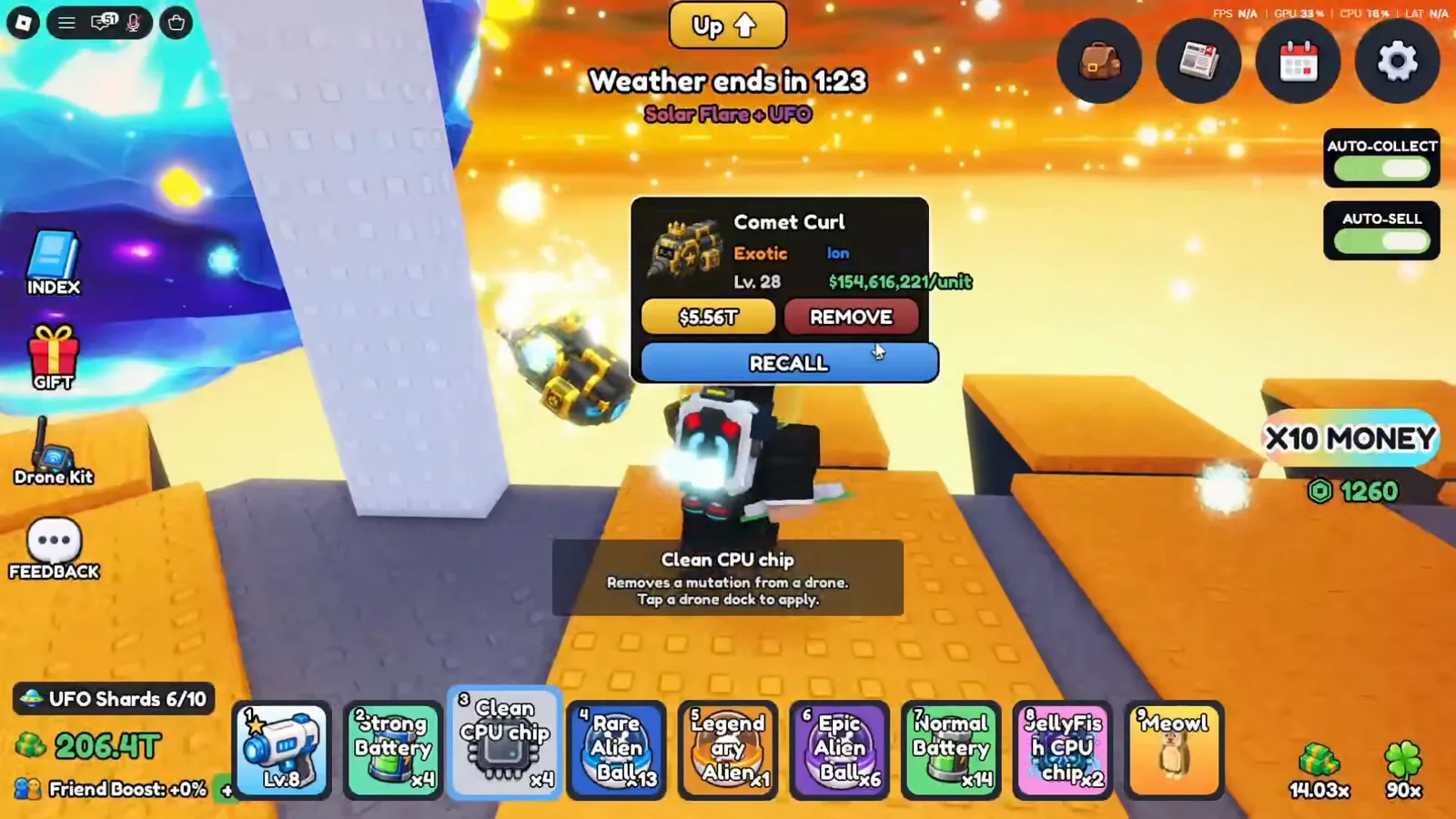
The mutation name appears next to the rarity on the drone card itself.Watch at 1:28 - 12
Confirm the result: the chip is spent and the tag is gone
Three seconds later, at 1:31, a green "Mutation removed" message floats at the top of the screen. The same Comet Curl card now reads "Exotic" with no Ion tag and a per-unit value of $88,352,126, and the hotbar stack has dropped from "Clean CPU chip x4" to x3 — the chip is consumed and nothing comes back into it. $154,616,221 divided by $88,352,126 is 1.75, which is exactly the figure the Index tile gives Ion. That is one drone, one removal, one screenshot: the game never states which value a mutation multiplier is applied to, so treat this as a lead and not a rule.
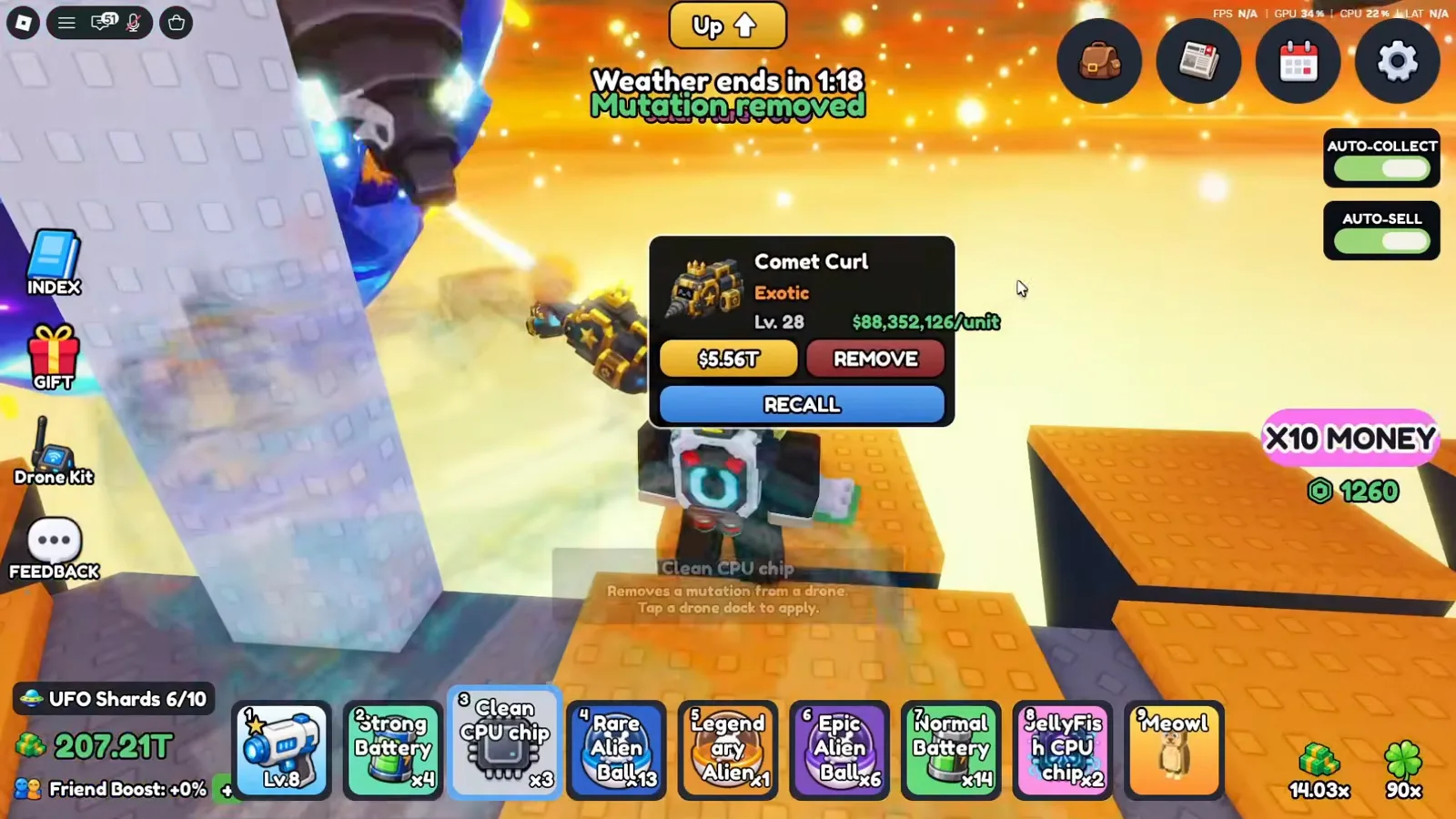
The Clean CPU chip stack also went from x4 to x3 — removal is not refundable.Watch at 1:31
Mutation CPU chip FAQ
Are mutation chips only stocked during a weather event?
Unknown from this footage. What the clip does show is the shop being browsed while the HUD still counts down to the next event ("Next event in 0:21" at 0:32), with all six mutation chips already listed at fixed prices and every one of them OUT OF STOCK. When the "Solar Flare + UFO Started!" banner fires at 0:54, the shop restocks in the same second and "Clean CPU chip" is suddenly STOCK: 1 with a live BUY button. The recording never visits the shop outside those two minutes, so it cannot answer whether chips are stocked at other times.
Can I move a mutation onto a better drone later?
Not in anything this footage shows. Removing a mutation with a Clean CPU chip consumes the chip (x4 becomes x3 between 1:28 and 1:31) and returns nothing — no chip carrying a mutation appears in the shop, and no "Mutated CPU chip" item is visible anywhere. The creator's narration gives the same advice in his own words, to hold JellyFish and UFO chips until you own an Exotic or Prismatic drone worth the price, but that is his opinion, not a rule printed on screen.
What does the mutation multiplier actually multiply?
Still unknown, and the game never says. The only numeric clue in this clip is the removal itself: taking Ion off Comet Curl moved its displayed per-unit value from $154,616,221 to $88,352,126, a factor of 1.75 — the same number the Index tile gives Ion. That is a single observation on a single drone, and the separate Mutation Index +25% line in the REVENUE panel never reveals its base either. Do not treat either figure as a confirmed formula.
Is the mutation cap 3x or 3.25x?
Both appear in the same video and neither is corrected. The weather banner at 0:54 promises "Drones can mutate - up to 3x value!", while the Index → Mutations panel at 1:18 gives Jellyfish its own tile at 3.25x, one step above the UFO tile at 3x. There is no third source in the clip that reconciles them, so this page reports the contradiction instead of picking a winner.
Useful next steps
Explore More Tools
Documented from dated 2026-07/08 footage: the in-game index reads 6/6, values run Blizzard 1.35x to JellyFish 3.25x, plus chip prices and what stays unknown.
DronesThe 51-slot Mine a Planet Drone Index: 11 rarities, documented names, observed roll odds from July 2026 footage, and the evidence boundary for Prismatic.
Tier ListEvery drone documented from the in-game Drone Index, banded by the game's own rarity ladder and the odds read off roll pedestals — not by invented stats.
How to Roll Drones in Mine a Planet (Roblox)Roll new drones, sell ore for cash, and spend it on Mining Speed and Cargo upgrades in Mine a Planet - illustrated with in-game Roblox screenshots.